

Technology & Inquiry with Joanna Lake

This week, we were lucky to have guest speaker Joanna Lake join us in class to talk about the ways she uses technology in the classroom. Joanna is currently a grade 8 teacher, but she has had experience in multiple grade levels so it was great to hear about all of her experiences.
Something that stood out to me was that Joanna is able to use technology in so many diverse ways in her classroom. Her tips for creating connections with our students were so great, and definitely adaptable for various grades. One thing that I can see myself using in the classroom is the mood scales she shared. I think using a mood scale is a great way to check-in with students, and connect with them at the beginning of the day.
Below are some more of the connection strategies Joanna mentioned that I can see myself using in the classroom.

Building connections that can be low risk for your students:
- Start each day the same: routine = predictability
- Watch a funny video, take attendance using would you rather, create a class playlist
- Check in with students: mood scales, finger scales, thumbs
I also really liked that Joanna mentioned FlipGrid, which I have used before with kids. It is such a fun way to have students complete assignments and learn. I agree with Joanna in that it is important to let students use technology to create assignments and complete class work, because they are already so comfortable with using devices. One downside with using so much technology is that we have to monitor screen time. If students are spending a lot of time using tablets and devices in class, there needs to be a lot of time spent outdoors to counteract that time. It is important that as teachers, we can give students a balance of screen time and outdoor play, especially when we don’t know what students do when they go home.
Joanna’s talk was especially helpful, considering that we are all about to start on our practicums. It was a great reminder that the main goal on practicum should be to connect with our students, by having 1 on 1 conversations with them every day, and talking to them about our own interests. I got so many great ideas from her, and I am so grateful that she is willing to share her slides & materials with us!
Arduino Science Journal
Arduino Science Journal is a really cool app you can get on your phone that basically turns your phone into various types of sensors. We tested out Science Journal during class, and it’s really cool what you can do even with just the free version! I think this would be such a great tool during science units. Each student could have an iPad or tablet with the Science Journal app on it, and then they could use it for all kinds of experiments.
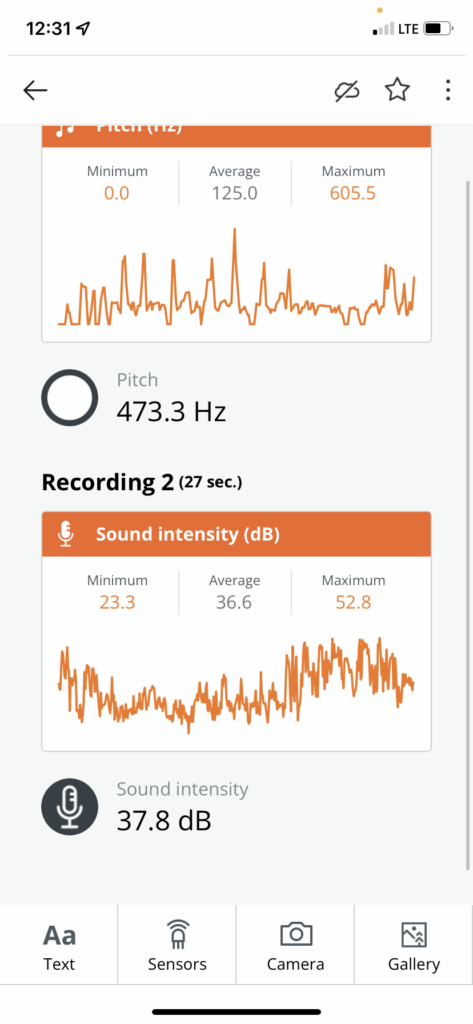
I used the distance measurement feature, and the sound feature. I thought it was so cool to see the sound waves jumping up and down depending on the level of sound around me.
I think Science Journal would be a great tool for teaching, but I think it might be more suited for intermediate elementary and middle school. I also think it would take some more exploring time for me to really figure out how to use this app effectively. I am not the most science-brained person, so I think it would probably take me a while to get a full grasp on the different features of this app. I think for a middle or high school science class, this would be a great tool to use.