In class this week, we talked about different Educational Technology learning theories. The SAMR theory of technology refers to the different levels that one can achieve when integrating technology into education.
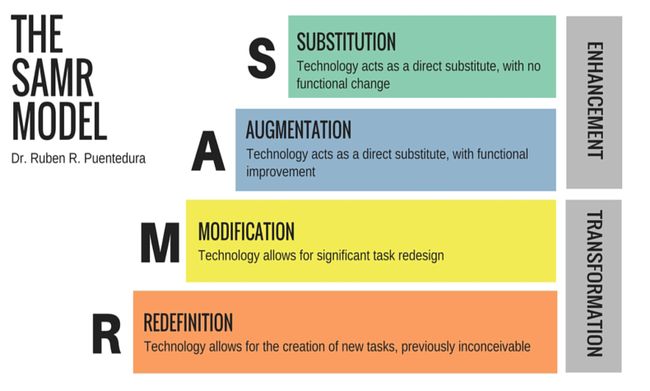
The graphic above, taken from this article on Edutopia, explains the 4 different levels incorporated in the SAMR model. I think this model is a really helpful tool for educators, and I can see myself using this in the future when integrating technology into my lessons. This model will remind me that I should try to strive to create activities that land in the modification or redefinition category, in order to ensure the activities are as interactive and effective as possible. Just having my students use Google Docs to type up their written work is not enough. This model allows educators to think about the technology they are using, and make sure they are using it as well as they can.

The SECTIONS model provides an in depth analysis that teachers can use for various online educational tools. By using the criteria that each letter of SECTIONS stands for, educators can analyze various websites and online tools and decide if it is a good tool to use in the classroom. This model is something that will be very helpful to me, and I think if I were to print off something that has each category written on it, and taped it onto my desk, it would be a great reminder when lesson planning. These are all things that as a teacher, we need to think about. It is important to test online tools and think about all possible factors before deciding to use it.
This website discusses the SECTIONS model in depth, and provides great examples of how to apply it in the classroom.
I had never heard of sketchnoting before this class, but I really enjoyed trying it out. I think that sketchnoting is something that could be really useful for students in grades 3-5, because it starts to teach them how to take effective notes. Students would love using the little symbols and shapes, and little drawings that they can use while taking notes. It also shows them how they can use art in a more freeform, quick way. A lot of the time art takes a lot of time to create and complete, but the point of a sketchnote is to quickly make drawings that represent main points of an article or a lecture. It would allow students to have fun while making notes on specific things, such as a novel they are reading or a project outline.
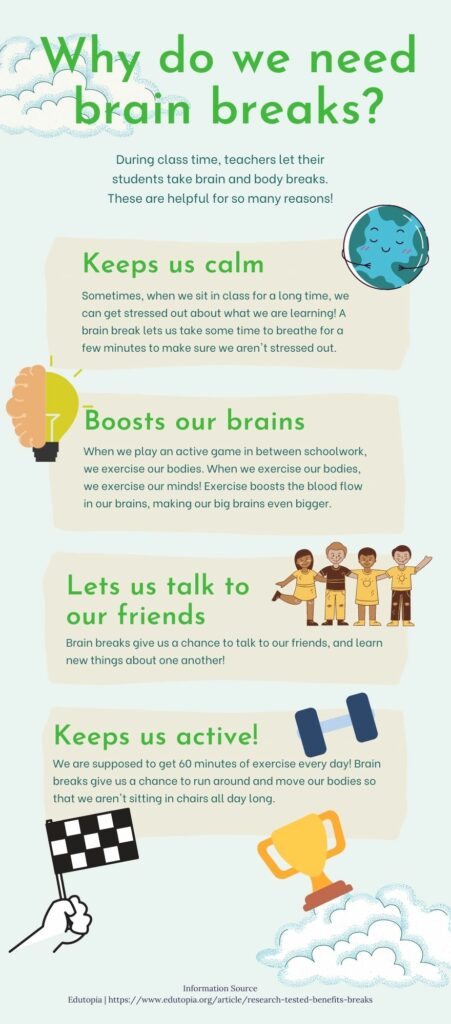
Below is the infographic I made using Canva in class. I decided to create one about taking brain breaks in classrooms, because I wanted to make something that could be useful to me as a teacher. I have used Canva before, and I had a lot of fun making this infographic! I started off by using a free template that I found, and changed up the information to suit what I wanted to write about. I am really happy with the end product, and I hope you enjoy reading it!